Looking for a versatile monitor stand that adapts to your workspace? This guide highlights five top-adjustable options designed to elevate comfort, maximize desk space, and support multiple screens. Each pick blends sturdy construction with ergonomic benefits to help reduce neck, shoulder, and back strain while keeping your desk organized.
Summary of selected products:
| Product | Brand | Key Benefit |
|---|---|---|
| Across-Star Dual-Monitor Stand Riser | Across-Star | Extends from 32″ to 40″ for dual screens; under-shelf storage |
| Hemudu Single LCD Monitor Stand HT05B-001 | Hemudu | Free-standing, adjustable height, wide compatibility |
| WALI Monitor Stand STT003 | WALI | Large shelf, adjustable height, reduces clutter |
| TAVR Dual Monitor Stand Riser | TAVR Furniture | Three-shelf, extra long, holds multiple devices |
| BoYata Monitor Stand | BoYata | Height adjustable, high weight capacity, anti-slip |
Across-Star Dual-Monitor Stand Riser

The Across-Star adjustable stand supports a retractable length from 32 inches to 40 inches, allowing flexible spacing for two screens or a single larger display. The design includes a spacious under-shelf area that accommodates a full-size keyboard and other desk essentials, helping to declutter the workspace. Raising two monitors to eye level promotes a comfortable viewing angle and can help alleviate neck and back strain. The stand is suitable for desks that routinely shift between single and dual-monitor setups, providing quick adjustment without tools.
Hemudu Single LCD Monitor Stand HT05B-001

This free-standing desk mount fits 13″ to 32″ screens with multiple VESA patterns and offers cable management to keep cords organized. The adjustable height and tilt/swivel/rotation capabilities enable an ergonomic viewing posture, with the monitor able to switch between landscape and portrait as needed. The mounting hardware and stability are designed for long hours of use, supporting a range of display types including LCD, LED, plasma, and small TVs.
WALI Monitor Stand STT003

The WALI stand features a roomy 14.6 x 9.3-inch top shelf with a maximum load of 44 lbs. Its height can be adjusted to 3.9, 4.7, or 5.5 inches, enabling a comfortable line of sight for a range of user heights. Rubber pads prevent slipping and protect the desk surface, and vented holes in the platform help maintain device cooling. This model is well-suited for a single monitor, laptop, or printer with stable, space-saving elevation.
TAVR Dual Monitor Stand Riser
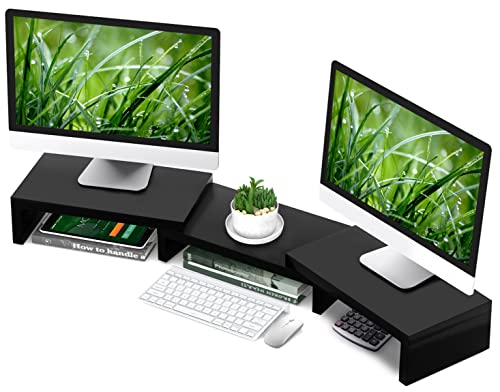
The TAVR stand presents an ergonomic height with a three-shelf design, enabling two or three monitors and additional devices to be organized in a compact footprint. It emphasizes a tidy, efficient workspace by providing under-rack storage for items like keyboards, mice, phones, or small peripherals. The assembly is described as quick and straightforward, with numbered parts for easy building. Its extra-long reach accommodates multiple screens and diverse desk configurations.
BoYata Monitor Stand

BoYata offers an adjustable-height monitor stand with a solid metal frame and a high weight capacity, designed to hold monitors, laptops, or small TVs securely. A twist knob lets users fine-tune the height to a comfortable level, helping to reduce neck and shoulder strain. The stand is built with anti-skid feet to prevent slipping and protect desk surfaces, providing a reliable, durable option for long-term use in workspaces or home offices.
Buying Guide
Key purchase considerations for an adjustable desktop monitor stand include compatibility, weight capacity, and ergonomics. First, confirm screen size range and VESA compatibility to ensure the stand fits your monitor(s) and mounting holes. If you use multiple displays, choose an extended-length or multi-monitor design that can support two or more screens without crowding the desk.
Ergonomics matter: look for stands that offer height adjustment, tilt, swivel, and rotation. Height adjustability should align the top of the monitor with eye level to reduce neck strain. Tilt and swivel help you adapt to different viewing angles and reduce glare. A stable base with non-slip feet protects both the monitor and the desk while a ventilated shelf or open space underneath helps with airflow and under-desk storage.
Space optimization is another consideration. Some models provide under-shelf storage for keyboards, notebooks, or small peripherals, while others incorporate built-in drawers or organizers. If you frequently switch between single and dual-monitor setups, an adjustable length or extensible design can be particularly valuable. Finally, consider aesthetics and build material; metal stands with quality finishing tend to be more durable and provide better stability for heavier displays.
Ease of assembly and included hardware can influence the overall value. Look for stands with clear instructions and labeled parts for quick setup. Cable management features help maintain a tidy workspace by keeping cords organized and out of sight. When evaluating options, compare how each stand’s features align with your desk space, monitor size, and daily workflow to pick the best fit for your needs.