When you need a sturdy, space-saving setup for two monitors, a double monitor desk stand can improve ergonomics, desk organization, and multi-tasking efficiency. This guide highlights five solid options across different budgets and needs. The top picks are best for multi-monitor workstations, gaming setups, and compact desks. Each section explains who it’s best for, why it’s recommended, and a practical limitation to consider.
| Product | Best For | Why It Stands Out | Note |
|---|---|---|---|
| Gianotter Dual Monitor Stand Riser | Home offices with small desks | Includes a drawer and pen holders for smart storage | Drawer depth may limit tall items |
| TAVR Monitor Stand Riser | Multi-device setups | Three storage spaces under the rack for accessories | Simple install; check weight limits |
| VIVO STAND-V002F | Large, stable dual-monitor setups | Heavy-duty base, full motion arms, cable clips | May require more desk space |
| HUANUO FlowLift | Gaming and design work | Wide compatibility and full motion with robust mounting | Desk compatibility conditions are strict |
| MOUNTUP Dual Monitor Stand | Versatile and easy install | VESA compatible with strong articulation | Requires set-up time for precise alignment |
Gianotter Dual Monitor Stand Riser With Drawer

The Gianotter monitor stand rises monitors to eye level and adds built-in storage. Best for writers and admin workers who value desk organization without sacrificing reach. The two magnetic pen holders and a dedicated drawer help keep small supplies within easy reach, reducing clutter. The elevated design frees space underneath for a wireless keyboard, pad, or small accessories, improving posture and reducing neck strain.
Who it’s best for: Small or shared desks where clutter-free work surfaces matter. Ideal for those who want immediate access to pens and other small tools while keeping the monitor height at a comfortable level.
Why chosen: Combines vertical adjustment with practical storage in one compact unit, supporting a tidy workflow. The compact footprint suits limited spaces.
Limitations: Drawer contents should be kept moderate to avoid crowding. Magnetic holders may not secure very large items.
TAVR Monitor Stand Riser
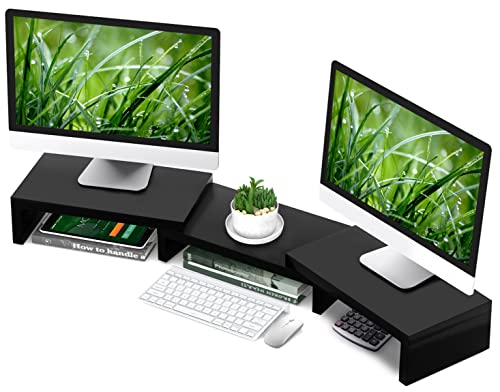
The TAVR desk riser elevates two monitors to eye level and includes multiple storage spaces underneath. It’s designed for users who manage several devices and accessories in small spaces, making it a strong choice for multi-device households or compact offices. The two-minute assembly and clear manual support quick setup, helping you achieve an organized, ergonomic workstation rapidly.
Who it’s best for: Professionals who operate two or more displays and need extra room for peripherals without sacrificing desk real estate.
Why chosen: The generous under-rack storage helps keep items like laptops, printers, and stationery neatly stowed, reducing desk clutter.
Limitations: Ensure the weight of mounted monitors falls within specified limits; verify your desk’s thickness can accommodate the mount.
VIVO STAND-V002F Dual Monitor Stand

The VIVO stand is built for larger, heavier setups with two screens up to 27 inches each. It offers full articulation—tilt, swivel, rotation, and height adjustment—plus a solid 13″ x 10.5″ base and integrated cable management. This model is better for users who want maximum adjustability and a stable foundation for frequent re-positioning, especially in workstations that require dynamic viewing angles.
Who it’s best for: Teams or solo professionals who frequently reconfigure screen layouts and need wide mobility without desk wobble.
Why chosen: The robust base and full-motion arms support a wide range of workflows and screen sizes while maintaining neat cable organization.
Limitations: Requires more desk footprint; ensure space is available for the base and arm swing.
HUANUO FlowLift Dual Monitor Stand

The HUANUO FlowLift supports wide screen compatibility and full motion for two monitors 13”–32” with VESA 75×75 or 100×100 mounting patterns. It uses a dual-clamp or grommet base to secure the arms firmly. This model is best when desk compatibility is verified and you need strong, adjustable mounts that accommodate larger displays or heavy workloads.
Who it’s best for: Users with larger monitors and desks that permit a sturdy clamp or grommet installation, wanting versatile mounting for creative work or gaming.
Why chosen: It balances wide compatibility with robust adjustment, allowing precise ergonomic positioning for both displays.
Limitations: Desk compatibility requirements are strict; confirm your desk type and thickness before purchase.
MOUNTUP Dual Monitor Stand

The MOUNTUP stand offers universal fit for 17″–32″ screens weighing 4.4–17.6 lbs with VESA 75×75 or 100×100. It delivers solid dual arms with 135° tilt, 180° swivel, and 360° rotation for flexible portrait or landscape viewing. The setup includes both C-clamp and grommet mounting options, making it adaptable to many desk configurations.
Who it’s best for: Users who want a versatile, easy-to-install system that can adapt to different desk thicknesses and mounting preferences.
Why chosen: Clear articulation and adaptable mounting options provide reliable customization for work, study, or gaming sessions.
Limitations: Proper alignment may take extra time during setup to achieve the ideal monitor heights and angles.
Buying Guide: Key Considerations For Selecting A Double Monitor Stand
- Monitor size and weight compatibility: Verify the supported screen size range and weight per monitor, plus VESA mounting compatibility (75×75 or 100×100 mm).
- Mounting style: C-clamp, grommet, or free-standing bases affect desk compatibility and stability. Choose based on desk thickness and construction.
- Adjustability: Look for tilt, swivel, rotation, and height adjustment to optimize ergonomic comfort and viewing angles for both monitors.
- Desk footprint: Measure available desk space and base footprint. Some stands require more clearance for arms to move freely.
- Storage and organization: Some models include drawers, shelves, or cable management features that help keep the workspace tidy.
- Installation ease: Consider models with straightforward assembly and clearly labeled parts for quick setup.
- Future-proofing: If you anticipate upgrading monitors, ensure the stand supports heavier loads and larger sizes.
Frequently Asked Questions
- What is the best monitor size for a dual setup?
- Do I need a grommet base or a C-clamp?
- Is full-motion adjustment necessary?
- Can I mount different sized monitors on the same stand?
- Will a dual monitor stand reduce desk clutter?
- How hard is installation?
Most stands support 13″ to 32″ monitors; choose sizes within the stand’s specified range to ensure secure mounting and proper clearance.
Use a C-clamp for small to medium desk thickness and when you don’t want to drill. A grommet base is ideal for thicker desks or when you prefer a more permanent installation.
Full motion is beneficial for frequent angle changes or collaborative work but may be less critical for a fixed dual-monitor setup.
Many stands support mixed sizes within the combined weight limits, but always check per-monitor compatibility and weight limits.
Yes, especially models with built-in storage or cable management features that keep cords and accessories organized.
Most stands offer straightforward installation, with hardware included. Complex desks or heavy monitors may require more time and careful alignment.