Searching for a floor-mounted monitor stand that fits your workspace? This guide highlights five strong options that balance height adjustability, sturdiness, and space efficiency. Each pick targets different buyers—from home offices needing simple ascent and tilt to classrooms or salons requiring heavy-duty floor stands. Below, you’ll find a quick product snapshot and a detailed section for each model to help you choose confidently.
Summary table of chosen products:
| Product | Best For | Key Benefit |
|---|---|---|
| Pholiten Single Tall Monitor Mount | Single-monitor desks with floor mounting | Versatile height and depth adjustability |
| VIVO Dual 13–27 Inch Stand | Dual-monitor setups | Extra tall pole and full motion |
| Hemudu Universal TV Stand Mount | 18–43 inch TVs and monitors | Wide tilt and swivel range |
| TVON Floor Stand | 13–50 inch displays | Good tilt and height range, versatile for many rooms |
| AX WABER Floor Stand | Budget-friendly 13–50 inch screens | Solid base with adjustable height |
Pholiten Single Tall Floor Monitor Mount

The Pholiten floor monitor mount is designed for a single screen, with a 47-inch pole to provide substantial height options for standing desks or elevated seating. Best for solo-monitor users who want to free desk space while maintaining precise eye-level alignment. The setup supports landscape or portrait orientations, and offers a motherboard-friendly freestanding option or grommet-style installation for flexible placement. Its main advantage is freeing desk space and reducing neck strain through adjustable height and depth.
Best for: a single user who values high vertical freedom and a clean desk underfoot. This model is a strong pick when you need a tall, unobtrusive footprint with flexible mounting options. Caution: the installation may require more floor space due to the tall pole and freestanding configuration.
VIVO Dual 13–27 Inch Floor Stand

The VIVO STAND-V012F supports two screens from 13″ to 27″ with VESA 75×75 or 100×100 mounts and a heavy-duty 40-inch pole. It features tilt, swivel, rotation, and full height adjustability to optimize viewing angles across dual displays. This is ideal for users who need a portable, height-extending, dual-monitor solution with solid stability. Caution: the base is freestanding, so ensure your floor and setup can support the footprint in tight spaces.
Hemudu Universal Floor TV Stand with Mount

The Hemudu floor stand is designed for TVs and computer monitors from 19″ to 43″, with a broad tilt range and 8-level height adjustments. It uses a tempered-glass base and a robust steel pillar for stability and a modern look. Best for multi-purpose spaces like bedrooms or living rooms where a shelf keeps accessories, gaming devices, or media players within easy reach. Limitation: the base’s glass component may require careful placement on slick floors or in high-traffic areas.
TVON Floor Stand For 13–50 Inch Displays

The TVON floor stand supports 13–50 inch screens with a broad tilt (-2° to +20°) and 6 height settings from about 44.6″ to 52.4″. Its versatility makes it suitable for home offices, dorms, or corporate settings needing easy portrait-to-landscape rotation for presentations or coding sessions. Best for: users who frequently adjust viewing angles to minimize glare. Caution: check VESA compatibility before purchase to ensure 200x200mm or smaller patterns are supported.
AX WABER Floor Stand for 13–50 Inch Screens
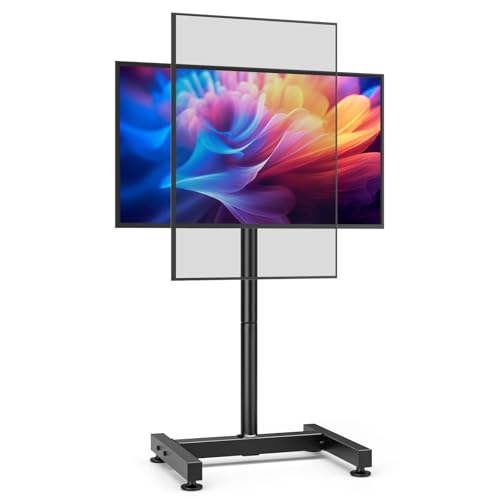
The AX WABER model holds 13–50 inch screens up to 77 lbs with VESA patterns from 75x75mm to 200x200mm. It features a tilting range from -10° to +10° and eight height adjustments, plus a sturdy H-style base for stability. Best for: budget-conscious buyers who still want a robust floor stand suitable for home or office use. Limitation: despite strong construction, large or heavy screens may require careful balancing on uneven floors.
Buying Guide: Key Considerations For Floor Monitor Stands
What screen size and weight do you need to support? Look for models that specify the supported range and weight, ensuring your display fits within those limits. For multi-monitor setups, prioritize stands with wide VESA compatibility and easy alignment features.
How adjustable should the height and tilt be? If you work while standing or alternate between positions, a taller pole and broad tilt range help reduce neck strain and glare. Check the tilt angles and height increments to match your seating posture.
What mounting option works best for your space? Freestanding bases maximize portability, while grommet or stud-mounted options save floor space. Consider room layout, foot traffic, and whether you need to move the setup often.
Is the base stable on your floor? A wide, sturdy base prevents tipping, especially with taller poles or heavier screens. Some bases use glass or metal; ensure the material fits your room’s style and safety needs.
What about assembly and maintenance? Choose stands with straightforward assembly and accessible adjustment knobs. Durable finishes and cable management features help keep the setup tidy over time.
Durability vs. budget: heavier-duty stands often offer better long-term stability, but for lighter workloads a mid-range model may suffice. Compare price against build quality, material, and warranty considerations.
FAQ
- Can I mount a TV or monitor on a floor stand? Yes. Many floor stands support both TVs and computer monitors within specified VESA patterns and weight limits.
- Is ceiling-height/standing work feasible with these stands? Some stands offer tall poles and wide tilt ranges suitable for standing work, but confirm the maximum height before buying.
- Will I be able to rotate my screen from portrait to landscape? Several models include rotate capabilities, allowing quick orientation changes for different tasks.
- Are these stands easy to move between rooms? Freestanding bases provide portability, while grommet or fixed mounts yield more permanence. Consider your need for mobility.
- What maintenance is required? Periodic tightening of joints and checking for loose screws help ensure stability and safety over time.
- Do these stands support multiple displays? Some models are dual-monitor capable; others are designed for a single screen. Check the product specs to match your setup.