Looking for a hidden or space-saving way to mount two monitors without clutter? This guide highlights five dependable options that blend dual-monitor capability with clean desk aesthetics. Each choice is best for compact workspaces, home offices, or dorm rooms where desk real estate is limited. We compare mounting mechanisms, adjustability, and installation style to help you pick the right fit for your setup.
Summary of selected products:
- VIVO STAND-V002F Dual LED LCD Monitor Free-Standing Desk Stand
- Dell MDS14 Dual Monitor Stand
- WALI Adjustable Dual Monitor Arm for 13-32 inch Screens
- VIVO STAND-V002 Dual Monitor Stand
- MOUNTUP Dual Monitor Stand for Desk
VIVO STAND-V002F Dual LED LCD Monitor Stand

The VIVO STAND-V002F supports two screens up to 27 inches and 22 lbs per monitor. It uses a freestanding base with detachable cable clips, keeping wires organized. This model offers +90° to -90° tilt, 180° swivel, 360° rotation, and height adjustment along the center pole. It is best for users who want a sturdy, stand-alone setup without mounting hardware on the desk edge. Limitation: the base footprint requires desk space and may be less suitable for ultra-compact desks.
Best for: those who want a freestanding, dual-monitor solution with strong cable management and full motion flexibility. If you prefer a floor-based or premounted look rather than clamped hardware, this is a solid choice.
Dell MDS14 Dual Monitor Stand
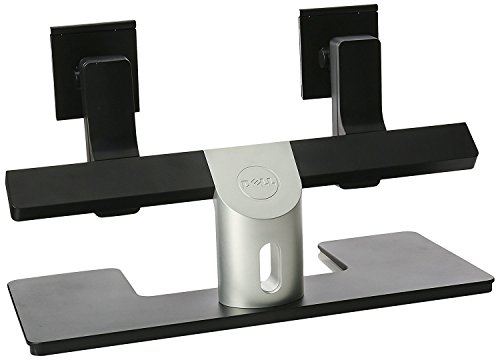
The Dell MDS14 supports two monitors of similar or different sizes and provides height, tilt, and swivel adjustments. Monitors can slide laterally to stay on the same visual plane. This stand is suitable for users who want synchronized monitor alignment and a streamlined, adjustable mounting solution. Limitation: installation may require more precise alignment, and users should verify compatibility with their monitor VESA patterns.
Best for: users needing precise lateral alignment and synchronized height between two monitors, especially when desk space is constrained and clean lines matter.
WALI Adjustable Dual Monitor Arm for 13-32 Inch Screens

The WALI dual monitor arms lift two screens off the desk, improving keyboard and accessory space. They accommodate up to 32″ screens, 22 lbs per arm, with 75x75mm or 100x100mm VESA patterns. Full motion includes +/− tilt, 19.3″ extension, 17.3″ height, and 360° rotation. Best for ergonomic adjustability and clutter-free desks. Limitation: assembly can be more involved for less experienced users, and maximum weight per arm should be observed.
Best for: users seeking extensive range of motion and a tidy desk with clear cord routing for multiple peripherals.
VIVO STAND-V002 Dual Monitor Stand

This freestanding stand supports two monitors 13″ to 27″ with up to 22 lbs per monitor. Features detachable cable clips, and adjustable tilt, swivel, and rotation for landscape or portrait orientations. Best for flexible desk layouts where a clean, tabletop solution is preferred. Limitation: base footprint may be noticeable on very small desks.
Best for: users who want a straightforward, highly adjustable dual-monitor setup with a compact footprint and easy cable management.
MOUNTUP Dual Monitor Stand for Desk

The MOUNTUP stand fits 4.4-17.6 lbs per monitor, 17-32 inches, with VESA 75×75 or 100×100 patterns. It includes a C-clamp and grommet base for sturdy desk mounting and a full motion range: 135° tilt, 180° swivel, 360° rotation. Best for those who want to mount both monitors securely and maximize desk space. Limitation: heavier configurations may require a sturdier desk surface to avoid wobble.
Buying Guide
What to consider when choosing a hidden dual monitor desk solution
- Desk type: Freestanding vs. clamped vs. grommet mounts. Freestanding units don’t modify the desk surface, while clamps and grommets maximize space but require edge access.
- Monitor size and weight: Confirm the combined weight and VESA pattern you plan to mount. Most options support 13″–32″ monitors with 22 lbs per arm or per monitor.
- Adjustment range: Look for tilt, swivel, and rotation capabilities to find ergonomic comfort and optimal viewing angles.
- Desk space and layout: Consider base footprint, arm reach, and whether you need cable management integrations.
- Installation skill: Some models require tool assembly or precise alignment; others are plug-and-play.
- Future-proofing: Choose mounts that accommodate potential monitor upgrades without replacing the entire setup.
Frequently Asked Questions
- What is a dual monitor arm best for in a small workspace?
Dual monitor arms maximize desk space by lifting screens off the surface, reducing clutter and improving ergonomics.
- Do I need to know my monitor’s VESA pattern?
Yes. Most mounts support 75×75 mm and 100×100 mm patterns. Check your monitors’ specs to ensure compatibility.
- Can I mount two large monitors on a single stand?
Yes, many models support up to 27″ or 32″ screens per arm, but verify weight limits per arm and overall stability.
- Which setup is easiest to install?
Freestanding and clamp-based mounts are typically straightforward; some grommet bases require more desk drilling or clearance.
- Is cable management important for dual monitors?
Yes. Integrated clips and channels help keep wires organized, reducing desk clutter and improving safety.
- What should I avoid when selecting a dual monitor desk solution?
Avoid models with insufficient load capacity or limited adjustment that won’t align with your typical viewing posture.