When running a modern checkout, having an iPad stand with an integrated printer shelf can streamline transactions, improve customer flow, and protect devices. The following selections emphasize universal iPad compatibility, sturdy builds, and practical printing capabilities. This guide compares five top options to help businesses choose the best fit for counter, kiosk, or service desk environments.
| Product | Brand | Key Benefit |
|---|---|---|
| Zywell TS32 White Stand | ZYWELL | Heavy-duty, no-installation use with printer shelf |
| Mount-It! iPad Kiosk Stand | Mount-It! | Locking enclosure and built-in printer shelf |
| ZYWELL TS32 iPad Pos Stand Swivel | ZYWELL | Swivel+tilt with printer shelf for compact POS |
| ZYWELL TS31 iPad POS Stand | ZYWELL | Tilting and wall-mount capable with printer shelf |
| CTA Anti-Theft Kiosk Stand | CTA Digital | Secure enclosure with printer shelf for high-traffic areas |
Zywell TS32 White Stand With Thermal Printer Shelf

The Zywell TS32 is an all-metal solution designed for POS, retail, and business environments. It supports tablets from 9.7 to 13 inches and comes with a dedicated thermal printer shelf. The stand requires no installation and is ready to use straight from the package, making it a strong option for quick setups. Its weight and robust construction offer stability in busy spaces, and a scratch-resistant foam pad helps protect the tablet during daily use. While heavy, the TS32 is built to securely hold a range of small thermal printers, and its universal clamping design accommodates various tablet widths, offering practical versatility for many checkout configurations.
Key considerations: compatibility with common 9.7″–13″ tablets, securable stability, and a printer shelf that supports compact printers. For a busy counter, the no-install approach reduces downtime, and the foam padding preserves device integrity. If you anticipate frequent repositioning, factor in the stand’s weight and plan for a fixed placement rather than mobile reconfiguration.
Mount-It! iPad Kiosk Stand With Printer Shelf

This Mount-It! model combines a locking, anti-theft enclosure with a built-in printer shelf, tailored for high-traffic environments such as retail, hospitality, and self-service kiosks. It supports iPad models from 7 to 10 inches, including Air and Pro variants, ensuring broad compatibility for most iPad configurations. The padded enclosure protects against scratches and tampering while maintaining a stable, secure fit. A dedicated printer shelf helps keep receipts organized, reducing desk clutter and improving cashier efficiency. The secure lock mechanism adds peace of mind in busy spaces where devices are accessible to customers.
Considerations include ensuring your printer’s footprint fits the 8.9″ x 6.1″ x 6.7″ maximum size, evaluating the enclosure’s depth for your specific iPad model, and confirming the counter or wall-mount options work within your space. This option is well-suited for venues needing strong security without sacrificing functionality.
ZywYell TS32 iPad Pos Stand Swivel With Thermal Printer Shelf
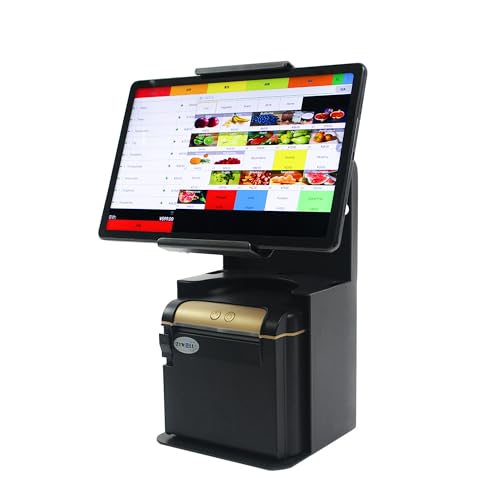
This stand emphasizes a swivel capability and tilting function, designed for point-of-sale workflows where operator and customer view angles matter. It accommodates 9.7″–13″ tablets and integrates a printer shelf to streamline receipt printing. The all-metal construction promises durability, while the tilting feature supports ergonomic use by cashiers during long shifts. Installation is straightforward, allowing immediate use upon unboxing, and the printer shelf consolidates essential hardware at the point of sale without occupying extra counter space.
When selecting this model, verify printer compatibility and the exact tilt/rotation range to match your staff’s typical transactions. It’s an excellent choice for stores and restaurants needing adaptable angles and space-efficient design in a single unit.
ZYWELL TS31 iPad POS Stand With Ticket Printer Shelf

The TS31 model targets retailers seeking an all-metal, installation-free POS stand with a ticket printer shelf and broad compatibility for 9.7″–13″ tablets. Its design prioritizes 180° and 360° rotation, enabling flexible cashier operations and enhanced customer viewing. The wall-mount option adds versatility for space-constrained setups, letting staff position the screen for optimal accessibility. This model aims to deliver a balanced blend of security, maneuverability, and space efficiency for busy service counters.
Consider how often you need wall mounting versus freestanding use, and ensure your printer’s dimensions fit the TS31’s dedicated shelf. For venues that require high visibility and adjustable angles, this stand provides the right mix of mobility and stability.
CTA Anti-Theft Kiosk Stand With Printer Shelf

The CTA Digital kiosk stands are engineered for high-security and high-traffic environments. The included locking enclosure and printer shelf help maintain organization and deter tampering, making it a practical choice for pharmacies, big-box retailers, and service counters. The device compatibility list covers a broad range of iPad generations and other tablets, ensuring the stand remains viable as devices evolve. Interior cable routing helps keep the workstation tidy, while padded bases protect surfaces from scratches and scuffs.
When evaluating CTA’s model, confirm your iPad and printer compatibility, evaluate the depth and footprint of the printer shelf, and assess how well the stand integrates with your counter layout and charging needs. This option emphasizes security without sacrificing ease of use.
Buying Guide: Key Purchase Considerations
- Compatibility: Verify the tablet size range (commonly 9.7″–13″) and ensure it covers your iPad model (Air, Pro, or standard).
- Printer Shelf Size: Check the maximum printer dimensions supported and whether your receipt printer’s width and depth fit the shelf footprint.
- Security: For high-traffic settings, consider locking enclosures and anti-tamper features to protect devices and receipts.
- Installation: Decide between “no installation” setups and wall-mount or fixed installations. Quick-start models save setup time but may limit repositioning later.
- Ergonomics: Look for tilt and rotation ranges that align with cashier and customer viewpoints to improve workflow and reduce strain.
- Durability: All-metal constructions offer long-lasting stability in busy environments, while padded enclosures protect screens from scratches.
- Space Efficiency: A printer shelf that integrates with the stand preserves counter space, especially in compact retail areas.
- Mobility vs. Stability: Heavier stands remain stable during busy checkout flows but may be harder to move; lighter models offer flexibility but require careful placement.
- Future-Proofing: Consider stands that accommodate multiple iPad generations or alternate tablet sizes to maximize longevity.
- Maintenance: Check ease of cleaning, access to ports, and cable management features to keep the setup tidy over time.
In selecting a best-fit iPad stand with a printer shelf, weigh security against flexibility, and assess how the stand will integrate with your current POS software and printer gear. The right model should provide reliable durability, straightforward installation, and ergonomic usability for staff and customers alike.