Looking for a long-reach wall mount monitor arm that fits your deep desk or corner setup? This guide highlights five top options with extended arms, designed to maximize space and ergonomic reach. Best for graphic designers, gamers, remote workers, and multi-monitor setups, these picks emphasize extended reach, solid VESA compatibility, and full-motion flexibility. Each entry explains who it’s best for, why chosen, and a practical limitation to consider.
| Product | Reach Range | Weight Capacity | VESA |
|---|---|---|---|
| WALI Long Arm Monitor Wall Mount | Up to 32.20 in | 22 lbs | 75×75 / 100×100 |
| PUTORSEN Monitor Wall Mount (30.28″ Reach) | Up to 30.28 in | 19.8 lbs | 75×75 / 100×100 |
| MOUNTUP Long Arm Monitor Wall Mount | Up to 27.97 in | 17.6 lbs | 75×75 / 100×100 |
| suptek Single Long Arm Mount | Up to 31.5 in | 24 lbs | 75×75 / 100×100 |
| PUTORSEN Extra Long Monitor Wall Mount | Up to 30 in | 35.3 lbs | 75×75 / 100×100 |
WALI Long Arm Monitor Wall Mount

The WALI long arm extends up to 32.20 inches, supporting 17″–33″ monitors up to 22 lbs and VESA 75×75 or 100×100. Best for remote workers or creators needing wide screen repositioning in corner layouts or multi-screen setups. The arm allows +70°/-45° tilt, ±90° swivel, and 360° rotation for ergonomic angles. Limitations include a heavier footprint for compact walls and potential stiffness on certain wall types.
PUTORSEN 30.28″ Reach Wall Mount

The PUTORSEN model offers an extra-long 30.28″ reach and retracts to 3.6″ from the wall, ideal for deep desks and sit-stand desks. It fits 17″–32″ monitors up to 19.8 lbs with VESA 75×75/100×100. A gas-spring arm enables smooth height and distance changes. Choose this if you need substantial extension with easy forward positioning; avoid if you have a lightweight monitor or minimal wall depth.
MOUNTUP Long Arm Wall Mount

The MOUNTUP arm extends to 27.97″, supports 17″–32″ monitors weighing 4.4–17.6 lbs with VESA 75×75/100×100. It offers +90°/-45° tilt, ±90° swivel, 360° rotation, and 10.6″ height adjustment. This is a solid option for users needing a balanced long reach with strong rotation for landscape or portrait setups. Best for mid-to-deep desks; limit is lower weight capacity than some other options, so verify your monitor weight.
suptek Long Arm Wall Mount

The suptek WMX3 supports 17″–35″ screens up to 24 lbs with VESA 75×75/100×100. It extends up to 31.5″ and provides ±80° tilt, ±90° swivel, and 360° rotation for versatile viewing. It’s best for larger desks or need to maximize wall positioning and cable management. A potential limitation is bulkier mass on smaller walls and longer arms can require sturdier mounting surfaces.
PUTORSEN Extra Long Monitor Arm for up to 45”
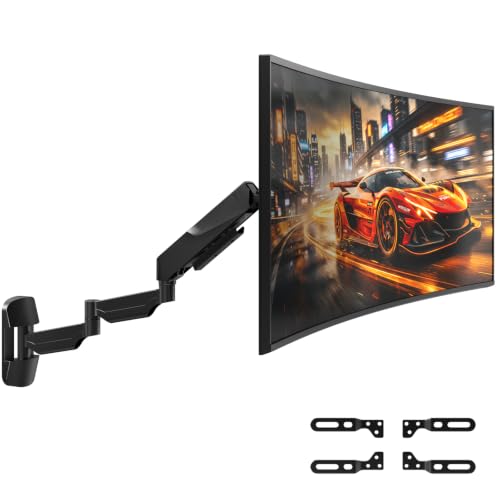
This model offers a 30″ reach, supporting up to 35.3 lbs (16 kg) monitors up to 45 inches. It provides a three-section arm for flexible viewing with tilt ±55°, swivel, and 360° rotation. Choose this if you need to mount a larger, heavier display with maximum reach; consider that heavy monitors require a robust wall mount installation and proper wall anchoring.
Buying Guide: Key Considerations for Long Reach Monitor Arms
- Monitor size and weight: Ensure compatibility with VESA patterns and weight limits. Heavier displays need sturdier arms and wall anchors.
- Reach versus space: Measure desk depth and wall space. Longer arms offer more position options but require more clearance near walls or furniture.
- Mounting surface: Verify wall type (stud, concrete) and anchor requirements. Some arms need solid backings for full extension.
- Finish and cable management: Look for integrated cable channels if neatness matters. Aesthetics may influence placement in living spaces.
- Motion range: Tilt, swivel, and rotation ranges affect ergonomic posture. Consider portrait vs. landscape orientation needs.
- Installation complexity: Some arms include gas-spring or multi-joint designs; ensure compatibility with your DIY capabilities.
Frequently Asked Questions
- What is considered a long reach wall mount arm? A long reach wall mount arm extends well beyond standard arms, often 27 inches or more, to position monitors away from the wall for deep desks or corner layouts.
- Can I mount multiple monitors with these arms? The listed products are single-arm solutions. For multiscreen setups, look for dual-arm wall mounts or separate arms that share a capable wall bracket.
- What monitors are compatible? Most support 17″–32″ to 35″ sizes with 75x75mm or 100x100mm VESA patterns. Always confirm weight limits and VESA compatibility for your model.
- Do these mounts require professional installation? Not necessarily, but proper wall anchors and mounting hardware are essential, especially for heavier monitors and extended arms.
- How do I choose between tilt, swivel, and rotation options? Tilt improves top-down viewing angles; swivel helps side-to-side adjustment; rotation enables portrait-to-landscape changes—choose based on your primary tasks.