Answering the common search for a reliable single vertical monitor stand, this guide highlights options that optimize desk space, improve posture, and simplify setup. The selections below are best for users who want a sturdy, easy-to-adjust stand for a single screen. Suitable buyers include home offices, students, and professionals who prefer a clutter-free workflow with quick height and angle adjustments. The quick-reference table that follows summarizes the five highlighted stands.
| Product | Brand | Screen Size Range | Weight Support | Key Benefit |
|---|---|---|---|---|
| Single LCD Monitor Free-Standing Desk Stand Mount Riser | Hemudu | 13″–32″ | Up to 77 lbs | Wide compatibility; strong base |
| Single Monitor Stand Freestanding 27-43 Inch | Hemudu | 27″–43″ | Up to 77 lbs | Broad size range; stable base |
| ErGear Single Monitor Arm | ErGear | 13″–34″ | Up to 19.8 lbs | Wide motion range; durable core |
| Suptek Single LCD Monitor Stand Mount Riser | Suptek | 13″–43″ | Up to 44 lbs | Strong base; versatile height |
| Amazon Basics Single Computer Monitor Stand | Amazon Basics | 13″–30″ | Up to 22 lbs | Simple, reliable desk arm |
Note: This article does not include prices or warranties. The selections emphasize stability, range of motion, and ease of installation to help you decide quickly which stand matches your needs.
Hemudu HT05B-001 Free-Standing Desk Stand

Best for: Users seeking a sturdy free-standing stand for a single screen up to 32 inches and 77 pounds. This model offers extensive compatibility with VESA 50x50mm, 75x75mm, and 100x100mm patterns and includes cable management. It supports -15° to +10° tilt, -50° to +50° swivel, and 360° rotation with 4 height levels, allowing portrait or landscape positioning. A clear limitation is that heavier, non-standard screens may require careful weight checks before use.
Hemudu HT05B-003 Freestanding Arm
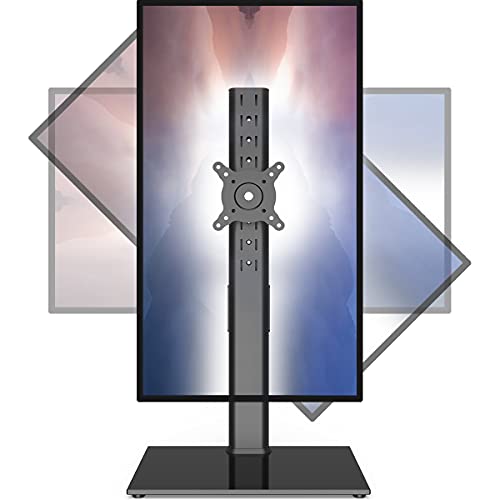
Best for: Large monitors in the 27–43 inch range requiring a wide base for stability. It provides full motion with up-down tilt, left-right swivel, and 360° rotation. Best for users who want flexible viewing angles without desk modification. Caution: ensure the desk can accommodate the broader base and heavier weight.
ErGear Single Monitor Arm

Best for: People who need maximum reach and ergonomic fine-tuning. The ErGear arm supports 13″–34″ screens up to 19.8 pounds with a broad tilt (-80° to +50°), swivel, and rotation. It is selected for its robust adjustability and smooth motion. Limitation: the weight limit may exclude heavier screens over 20 pounds.
Suptek Single LCD Monitor Stand Mount Riser

Best for: Office users needing a compact base with strong stability. Compatible with 13″–43″ screens up to 44 pounds, it uses a steel column and wooden base, plus anti-slip pads. It offers five height options (9.27″–15.16″) to align screen height with eye level. Not ideal for very tall desks where base clearance is limited.
Amazon Basics Single Monitor Stand

Best for: Budget-conscious buyers seeking a reliable, adjustable desk arm for 13″–30″ screens up to 22 pounds. Features full motion with 360° rotation, -15° to +85° tilt, and cable management. Choose this if you want a straightforward setup and dependable function without frills.
Buying Guide
- What screen size and weight can you support? Check the maximum screen size and weight each stand advertises. Heavier or larger screens may require a stronger base or different mounting pattern.
- What VESA pattern do you need? Most stands support 50x50mm, 75x75mm, or 100x100mm. Confirm your monitor’s pattern before purchase.
- Do you want freestanding or desk-mounted? Freestanding models are easier to install and don’t require desk modification. Desk-mounted arms free up space but may require clamping or drilling.
- What range of motion matters most? Look for tilt, swivel, and rotation ranges that match your workflow. Full portrait/landscape rotation is helpful for coding or design work.
- Is height adjustment important? A wide height range helps align the monitor with your eye level, reducing neck strain during long sessions.
- Cable management? Integrated cord clips or channels keep cables tidy and reduce desk clutter.
FAQ
- What is a single vertical monitor stand? It is a stand or arm designed to hold one monitor upright, freeing desk space and enabling easy height and angle adjustments.
- Do these supports fit curved monitors? Many do, especially stands rated for 27″–43″ curved displays, but always check weight limits and VESA compatibility.
- Can I use portrait orientation? Yes, most stands support portrait and landscape layouts via rotation features.
- Is assembly difficult? Most models are designed for tool-free or simple assembly with included hardware. Verify installation steps in product details.
- Will a freestanding base damage my desk? Choose anti-slip pads or a heavy base to minimize movement and protect surfaces.
- What should I consider before buying? Match screen size, weight, VESA pattern, desk space, and desired motion range to pick the best fit.