The best universal TV wall mount depends on your TV’s size, weight, VESA pattern, and wall construction. For compact screens, the Amazon Basics mount supports 26- to 55-inch TVs; Mounting Dream and USX MOUNT offer full motion for many mid-size TVs; Perlegear suits larger screens; and Mounting Dream’s tilting model keeps a big TV close to the wall. Check the specifications of both your TV and wall before choosing.
| Mount | Best For | Key Fit Range |
|---|---|---|
| Amazon Basics Full Motion | Smaller TVs and single-stud installation | 26–55 inches; up to 80 lbs |
| Mounting Dream Full Motion | Mid-size TVs and broad extension | 32–70 inches; up to 110 lbs |
| USX MOUNT Full Motion | Mid-size TVs and 12- or 16-inch studs | 32–70 inches; up to 99 lbs |
| Perlegear Full Motion | Large TVs and wide VESA patterns | 42–97 inches; up to 132 lbs |
| Mounting Dream Tilting | Large TVs mounted close to the wall | 37–90 inches; up to 132 lbs |
Amazon Basics Full Motion Mount

This full-motion mount is best for buyers with a 26- to 55-inch TV weighing no more than 80 pounds who want the flexibility to adjust their screen. It is designed for installation on a single wood stud, concrete, or brick, making its mounting method an important point to verify before purchase.
Choose this option if your TV falls within its stated size and weight limits and you want swivel and tilt functionality. The product listing emphasizes checking its “Designed for” details, so compare your TV and wall type against those requirements. Its stated capacity is lower than the larger-screen options in this guide.
Mounting Dream Full Motion Mount

This mount is best for many 32- to 70-inch TVs weighing up to 110 pounds, with a maximum VESA pattern of 400 x 400 mm. It is designed for standard 16-inch studs and provides tilt, left-or-right swivel, and extension from 3.4 to 17.5 inches.
Installation features include pre-labeled hardware bags, a paper template, and post-installation leveling adjustment of plus or minus three degrees. Choose it if you want a TV that can extend well away from the wall. Avoid it if your wood studs are spaced more than 16 inches apart; the listing points buyers with wider spacing to a different model.
USX MOUNT Dual-Arm Full Motion Mount

The USX MOUNT is best for buyers with a 32- to 70-inch TV weighing up to 99 pounds and a VESA pattern from 75 x 75 mm to 400 x 400 mm. Its stated wall options include 12- or 16-inch wood studs, concrete, and brick.
Its dual articulating arms extend 13.89 inches and retract to 2.59 inches. The mount tilts from -12 to +5 degrees and swivels for different seating positions. Choose it if you need the listed 12-inch stud option or want a compact retracted position. Check your TV’s size, weight, and VESA pattern first; its weight limit is below the 110- and 132-pound options here.
Perlegear Large-TV Full Motion Mount

This Perlegear mount is best for large TVs measuring 42 to 97 inches and weighing up to 132 pounds. It supports VESA patterns from 200 x 100 mm to 600 x 400 mm. The listing specifies installation on 12- or 16-inch wood studs, solid concrete, or brick.
Features include tool-free tilt from +5 to -15 degrees, swivel up to 45 degrees in either direction, security locks, and anti-drop end caps. The listing describes it as UL-listed and notes reinforced arms and a larger wall plate. Choose it for a large screen needing a broad VESA range. If wood studs are more than 16 inches apart, the listing says an extension bracket is needed.
Mounting Dream Low-Profile Tilting Mount
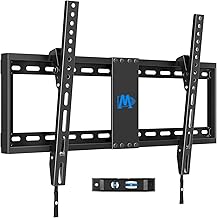
This tilting mount is best for buyers who want a 37- to 90-inch TV close to the wall rather than extended on articulating arms. It supports TVs up to 132 pounds, has a maximum VESA pattern of 600 x 400 mm, and supports wood-stud spacing up to 24 inches.
Its low-profile design places the TV 1.5 inches from the wall, and the screen tilts forward up to eight degrees to help reduce glare. Choose it if a slim installation and broad stud-spacing support matter more than swivel or extension. It offers tilt but does not provide the full-motion adjustments of the articulating mounts above.
Buying Guide: How To Choose A Universal TV Wall Mount
What should I check before buying?
Match four specifications: TV screen size, TV weight, VESA mounting pattern, and wall construction or stud spacing. VESA is the distance between the mounting holes on the back of the TV, usually listed in millimeters. A mount may fit the screen size but still be unsuitable if the TV is too heavy or its hole pattern falls outside the mount’s range.
Should I choose full motion or tilt?
Full-motion mounts can swivel and extend, which helps when viewing from different seats or when the screen needs to move away from the wall. Tilting mounts are a better fit when forward tilt is enough and a low-profile installation is the priority. Compare the listed movement range rather than assuming every full-motion mount extends or tilts by the same amount.
Does wall type and stud spacing matter?
Yes. The products listed here specify different installation surfaces and stud spacing. Confirm whether your wall is wood stud, concrete, or brick, and follow the mount’s instructions for the applicable wall type. Do not assume that a mount designed for standard 16-inch studs will fit wider spacing.
How much weight capacity should I look for?
Choose a mount whose stated weight limit is at least as high as your TV’s listed weight, while also checking the screen-size and VESA limits. These products range from an 80-pound capacity to 132 pounds. Weight capacity alone does not confirm fit; all mounting requirements must match.
Frequently Asked Questions
Are universal TV wall mounts compatible with every TV?
No. “Universal” does not mean a mount fits every TV. Check its screen-size range, weight limit, VESA pattern, and installation requirements against your specific TV and wall.
What does VESA mean on a TV mount?
VESA describes the spacing of the mounting holes on the TV’s back. Compare that measurement with the mount’s supported VESA range before buying.
Can a full-motion mount be installed on brick?
Some mounts in this guide list concrete or brick as supported wall types, while others specify different requirements. Check the selected product’s installation details and use the appropriate instructions and hardware.
Which mount is best for a large TV close to the wall?
The Mounting Dream tilting model is designed to sit 1.5 inches from the wall and supports TVs from 37 to 90 inches, up to 132 pounds. Confirm the VESA pattern and stud spacing before choosing it.