The right wall-mounted monitor and keyboard setup can save desk space, reduce clutter, and improve posture. This guide highlights five top options that balance all-in-one design with ergonomic adjustability. Ideal buyers include small-office renters, medical or industrial workplaces needing space-saving stations, and home offices seeking a clean, standing-desk alternative. The selections cover a range of budgets, build quality, and features to help you choose the best fit for your workflow.
Summary table of selected products:
| Product | ||
|---|---|---|
| PUTUOSEN Wall Mount Monitor Arm with Keyboard Tray | Versatile, heavy-duty setups | Wide monitor compatibility and full articulation |
| Mount Plus MED02 Medical Wall Mount Workstation | Medical or shared workstations | Foldable keyboard tray with large sliding mouse pad |
| TooCust All-in-One Monitor Wall Mount | Mac mini or small PCs | Integrated mouse space and foldable keyboard tray |
| Mount-It! Monitor and Keyboard Wall Mount | Home offices with standing-work needs | Ergonomic tray arm with versatile VESA options |
| VIVO Sit-Stand Pneumatic Arm Wall Mount | Budget-friendly height-adjustable rigs | Gas-spring stand-up capability with full articulation |
PUTUOSEN Wall Mount Monitor Arm With Keyboard Tray

Best for heavy-duty, space-saving setups, this wall mount supports most 17–32 inch monitors and a display arm up to 26.4 lbs, with the keyboard tray handling up to 19.8 lbs. The monitor offers -35° to +35° tilt, 180° swivel, and 360° rotation for flexible viewing, plus a large 25.7 x 9.5 inch keyboard tray to maximize desk space. Ideal for compact offices, classrooms, or apartments where wall mounting is essential. Caution: maximum capacity on both arm and tray should be respected to avoid sagging over time.
Who it’s best for: users needing strong, all-in-one wall mounting with broad monitor compatibility and a roomy keyboard area. Why selected: combines robust load capacity with full articulation for comfortable, dynamic workstyles. Limitation: installation may require careful alignment and sturdy wall anchors to support weight.
Mount Plus MED02 Medical Wall Mount Workstation

This medical-grade wall workstation emphasizes a large sliding mouse pad, foldable keyboard tray, and a height-adjustable monitor arm. It accommodates 17″–35″ screens and provides a folding tray to tailor height and angle for ergonomic typing. Best for clinical or shared workspaces where space and hygiene matter. Caution: ensure the wall structure can support the installation and extended tray reach without interference with surrounding equipment.
Who it’s best for: healthcare settings or labs needing a sturdy, easy-to-clean station with additional scanner or device space. Why selected: specialized features like the folding keyboard tray and extended mouse pad optimize workflow. Limitation: total footprint increases when the tray is extended or tray folded out of use.
TooCust All-in-One Monitor Wall Mount With Keyboard Tray
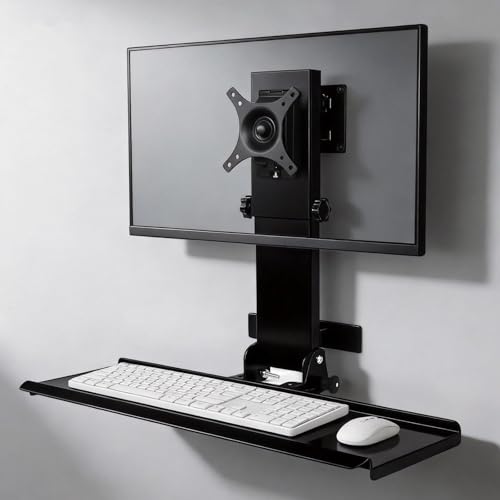
All-in-one design aims at Mac mini or small PCs with integrated keyboard tray and adjustable arm. The foldable 26″ platform fits mainstream keyboards and tucks away when not in use, freeing up desk space. It uses anti-loosening screws for added stability and supports screen sizes from 17″ to 32″ with VESA 75/100 compatibility. Best for compact, professional setups that require a neat, integrated solution. Caution: compatibility depends on the keyboard width and mouse space requirements.
Who it’s best for: users wanting a cohesive wall-mounted system that also accommodates a Mac mini setup or compact PC. Why selected: space-saving foldable tray and secure mounting. Limitation: claimed strength is strong, but checkerboard-like wall anchors may be required for heavier displays or extended arms.
Mount-It! Monitor And Keyboard Wall Mount
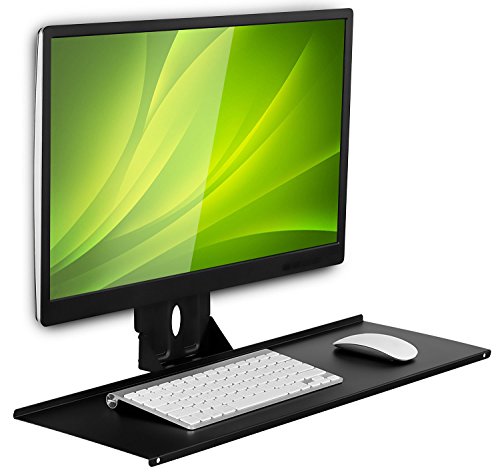
This solution emphasizes ergonomic efficiency in a compact wall-mounted tray arm. It supports mounting a monitor and keyboard on the wall, with a 25.6-inch wide tray suitable for keyboard and mouse. The setup offers a swiveling option and a low-profile mount appearance, ideal for modern home offices. Best for users who want a straightforward, all-in-one wall desk alternative. Caution: VESA wall or desk mount is not included, so check compatibility with your monitor and desk hardware.
Mount Plus MED01 Medical Monitor And Keyboard Wall Mount
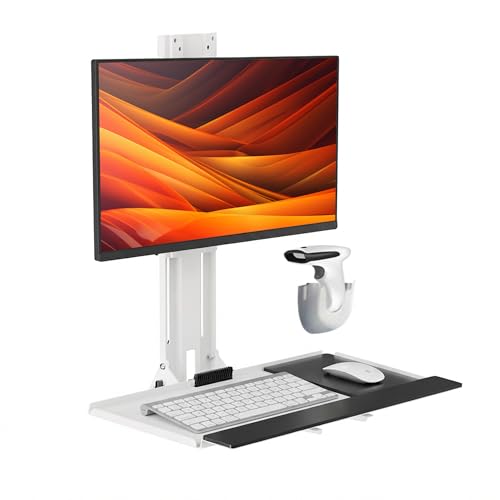
This medical-grade wall mount offers an adjustable monitor arm and a height-adjustable keyboard tray, plus a wide platform with a mouse pad. It’s designed to fit 17″–32″ displays and includes a scanner holder. Best for clinics, hospitals, or industrial facilities needing a compact, adjustable wall workstation with scanner support. Caution: check the tray height range to ensure comfortable typing for all users in a shared space.
Buying Guide: Key Purchase Considerations
Ask these practical questions to narrow choices:
- What screen size and weight will I mount? Choose models supporting your range (often 17″–32″ and up to ~20–26 lbs for arms, 17–19 lbs for trays).
- Do I need height or angle adjustability? Full articulation (tilt, swivel, rotate) improves ergonomics, especially for sit-stand use.
- Is space the primary constraint? Look for foldable trays or sliding mouse pads to maximize desk clearance.
- What’s the installation environment? Medical or industrial settings may require rugged mounts or scanner holders.
- Are there any device compatibility notes? VESA patterns (75×75 or 100×100) are common; verify wall material for secure mounting.
- Do you need an integrated solution? All-in-one mounts simplify setup but verify tray dimensions and keyboard compatibility.
FAQ
- What is the main advantage of a wall-mounted keyboard tray? It frees desk space and can improve posture by enabling a standing or varied-height workstation.
- Can these mounts support a Mac mini or small PC? Yes, many include a platform or integrated space for small devices, but check weight and dimensions.
- Is installation difficult on plaster walls? Some models require studs or heavy-duty anchors; review wall type and hardware supplied.
- Do all units include cable management? Many offer basic cord clips, but you may need additional ties for neat organization.
- What maintenance is required? Periodically verify screws, joints, and gas-spring tension if present to maintain stability.
- Which option is best for shared workspaces? Look for height-adjustable trays and foldable components to accommodate multiple users.