Choosing the right wall mounted network cabinet helps protect gear while saving floor space. This guide highlights five solid options, spanning small 6U units to larger 12U configurations, all designed for 19″ IT equipment, AV devices, and media gear. Each cabinet offers security features, adjustable mounting rails, and cable management options to support clean, scalable installations in offices, classrooms, or retail spaces.
Summary of Selected Products
| Product | Brand | Depth | Key Benefit |
|---|---|---|---|
| Tecmojo 6U Wall Mount Server Cabinet | Tecmojo | 17.72″ D | Lockable doors, adjustable rails, flexible door orientation |
| NavePoint 12U Server Rack Enclosure | NavePoint | 24.42″ H | Tempered glass door, removable side panels, robust 110 lb support |
| StarTech 4-Post 12U Wall Mount Cabinet | StarTech | Up to 16″ depth | 180° access, lockable, removable panels |
| Tecmojo 12U Wall Mount Server Cabinet | Tecmojo | 17.72″ D | Lockable glass door, adjustable rails, cable access |
| VEVOR 12U Wall Mount Cabinet | VEVOR | 15.5″ D | Ventilated design, 200 lb max load, secure doors |
Tecmojo 6U Wall Mount Server Cabinet

Designed to save floor space, this 6U cabinet measures 13.78″ H x 21.65″ W x 17.72″ D with a maximum mounting depth of 14.2″. The glass door and side panels are lockable to deter unauthorized access, and the front door can be oriented to suit your door swing preference. Fully adjustable rails and numbered U positions support flexible installation, while top and bottom punch-out panels simplify cable management.
NavePoint 12U Server Rack Enclosure
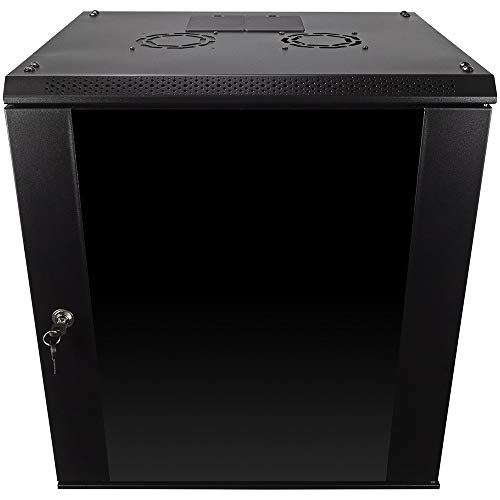
This 12U cabinet uses cold rolled steel and a welded frame to provide a sturdy base for IT gear, supporting up to 110 lbs. It features a reinforced tempered glass front door with a security lock, removable side panels, and a compact footprint (17.72″ L x 21.65″ W x 24.42″ H) for space-constrained environments. Easy customization is offered through removable side panels and locks for secure, adaptable configurations.
StarTech 4-Post 12U Wall Mount Cabinet

This 12U wall-mount cabinet uses a four-post design with adjustable depth (2.4″ to 16″) and a 180° hinged, lockable front for easy access to rear connections. It includes a reversible, removable front door and removable side panels, plus a 198 lb (90 kg) maximum weight capacity. Constructed from SPCC cold-rolled steel for durability, it’s suited for network switches, patch panels, and other rackmounted devices.
Tecmojo 12U Wall Mount Server Cabinet

This 12U cabinet prioritizes space efficiency with dimensions of 24.25″ H x 21.65″ W x 17.72″ D and a maximum mounting depth of 14.2″. It features lockable glass doors and side panels for security, plus adjustable rails and numbered U positions for straightforward equipment mounting. The cabinet supports flexible door orientation and includes top and bottom punch-out panels to ease cable routing.
VEVOR 6U Wall Mount Network Cabinet

This 6U unit emphasizes space saving with a shallow depth of 15.5″. It offers a locking glass door and side panels for security, plus a sturdy welded frame rated for up to 100 lbs on the wall and 200 lbs when floor-mounted. Its vented design supports airflow, helping prevent overheating in compact IT setups.
VEVOR 12U Wall Mount Cabinet

This 12U option mirrors a typical wall mount footprint with a 15.5″ depth, a secure glass door with locking side panels, and a sturdy welded frame. It supports a significant load up to 200 lbs in ground configurations, making it suitable for more substantial equipment while maintaining space efficiency in constrained environments.
Buying Guide: Key Purchase Considerations
- Size and depth: Measure available wall space and confirm the cabinet depth matches your rack gear’s depth to avoid clearance issues.
- Weight capacity: Choose a cabinet that exceeds your current load by a safe margin to accommodate future equipment without overstressing the frame.
- Security features: Lockable doors and side panels help deter tampering. Reversible or removable doors can improve installation flexibility.
- Access and cabling: Look for cabinets with 180° rear access, punch-out panels, and cable management features to simplify wiring and future upgrades.
- Ventilation and cooling: Ventilated panels or built-in fans help prevent overheating for densely packed gear.
- Material quality: Cold-rolled steel and welded frames generally offer greater durability and longevity in IT environments.
- Installation orientation: Some doors can swing left or right; consider whether a wall mount or floor-standing option better suits your space.
- Security vs. accessibility: Glass doors provide visibility but may be less robust than solid doors; balance security with easy access for maintenance.
- Expansion potential: If planning future growth, pick a cabinet with adjustable rails, removable side panels, and compatibility with additional shelving or units.
When evaluating options, align features with your use case—whether it’s a small office networking rack, a classroom audiovisual system, or a retail back office. The selected products above offer a range of depths, capacities, and access models to fit different installation constraints while maintaining robust security and manageable cable layouts.